How to Pasaload Globe – Share Load in Globe

Do you need to send a load to a friend or family member? Globe makes it easy to share load anytime using your mobile phone or the GlobeOne app.
In this guide, you’ll learn how to pasaload in Globe. It includes step-by-step instructions for prepaid users. You’ll find out how to share load using *143# and other quick methods for sending credits safely. Whether you want to help someone in an emergency or share your load for convenience, this guide covers everything you need to know about sharing a load on Globe.
What Is Pasaload in Globe?
Pasaload in Globe is a convenient service that lets Globe and TM users instantly send mobile credits to friends or family. Sharing load is quick, safe, and easy. It’s great for emergencies, staying connected, or helping someone add to their balance.
This feature works for Globe prepaid numbers, allowing you to transfer amounts from ₱10 to ₱150 per transaction. Daily limits may apply. Postpaid Globe accounts can’t share load. However, you can help postpaid users by paying their bills directly through the GlobeOne app or GCash. With pasaload, you can always stay connected with your loved ones without worrying about running out of credit.
How to Share a Load in Globe Using 143#
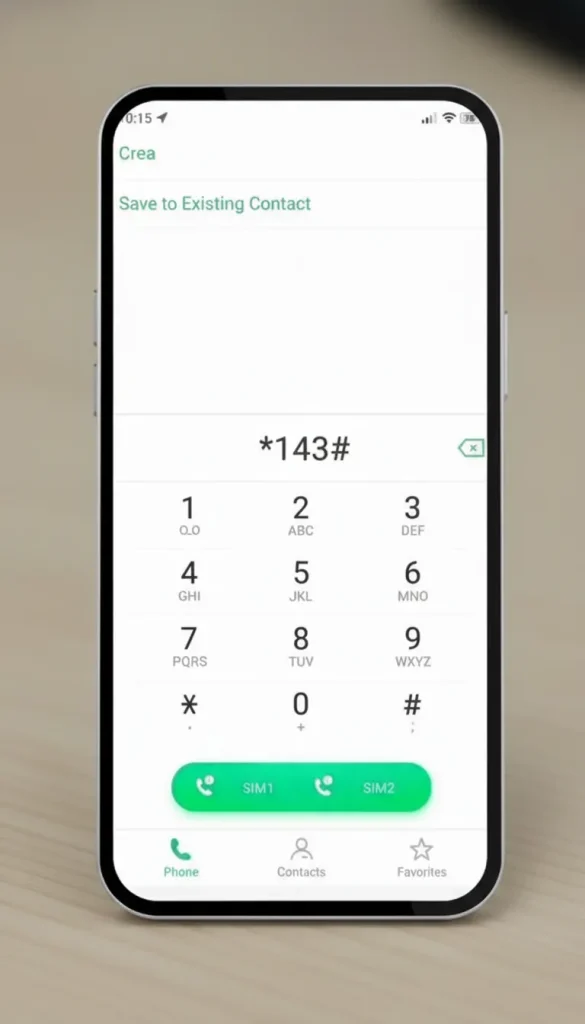
One of the easiest ways to share a load in Globe is by using the USSD code *143#. This method works directly from your Globe prepaid number and doesn’t require an internet connection.
This method is fast, reliable, and perfect for everyday load sharing. Using *143# ensures your load reaches the recipient promptly. This keeps you and your loved ones connected. Follow these simple steps to send a load quickly and safely.
- Dial *143# from your Globe mobile.
2. Select My Account from the menu.
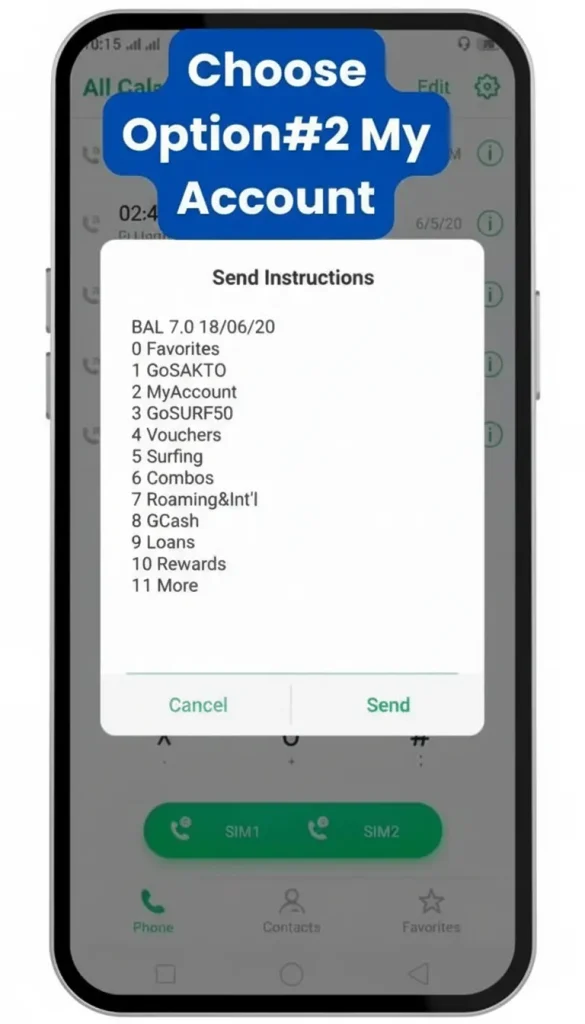
- Tap “Share-A-Load / Promo / MB.”
- Choose Share Load.
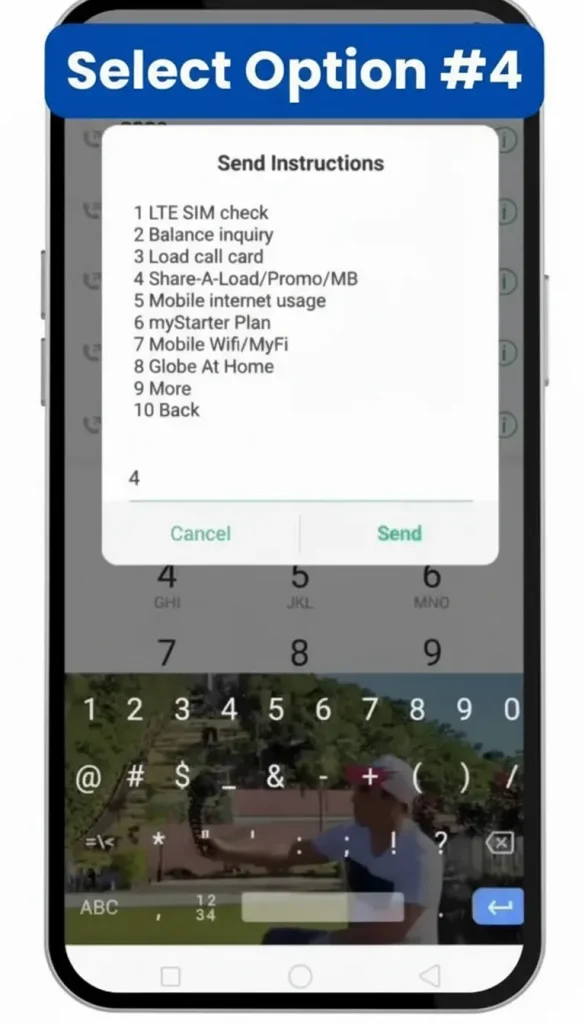
5. Enter the recipient’s 10-digit Globe or TM number.
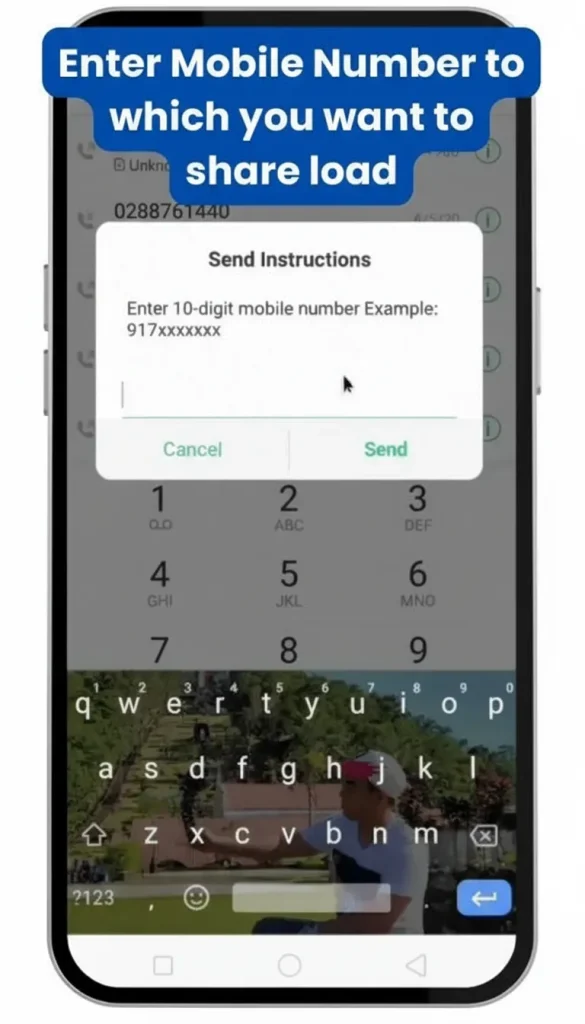
- Input the amount you want to send.
- Confirm the transaction by typing YES.
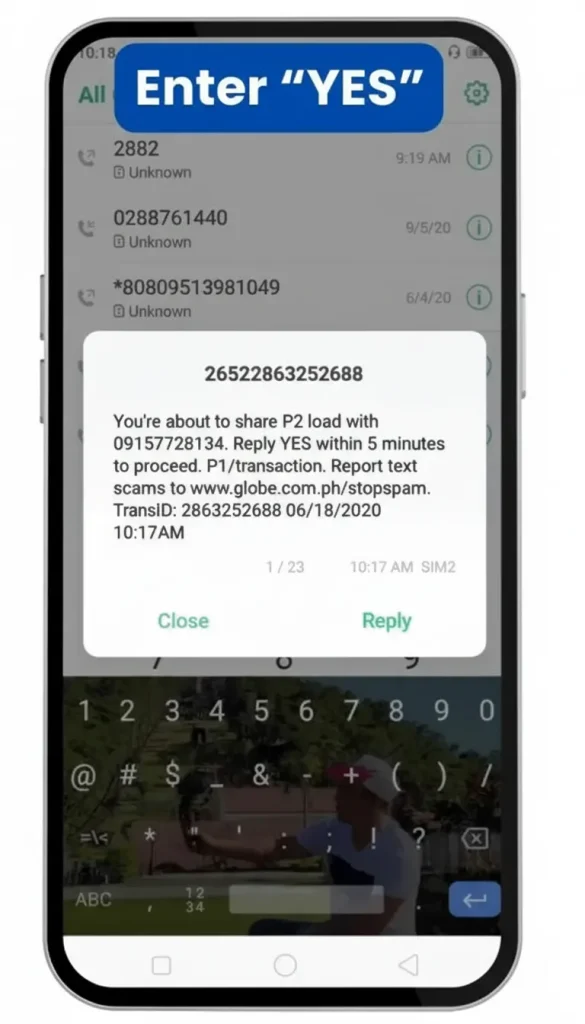
8. If prompted, enter your 4-digit Share PIN for extra security.
Other Ways to Share Load in Globe
Share Load via GlobeOne App
- Open the GlobeOne app on your mobile device.
- Log in using your Globe or TM number.
- Tap Shop and select Buy Load.
- Enter the recipient’s mobile number.
- Choose the amount of load you want to send.
- Confirm the transaction to complete the process. No PIN is required, and you can easily track all your sent loads.
Share Load via SMS
- Open your messaging app.
- Enter the recipient’s number with the two prefixes (example: 2+0917xxxxxxx).
- Type the load amount you want to send.
- Include your 4-digit Share PIN in the message if prompted.
- Send the message.
- Reply YES to confirm the transaction when Globe prompts you.
- Always double-check the recipient number and the load amount to avoid errors.
Share Load via GCash
GCash sometimes offers promos or cashback when sending load, making it extra convenient.
- Open the GCash app on your phone.
- Tap Buy Load.
- Enter the recipient’s Globe or TM number.
- Choose the amount of load to send.
- Confirm and pay using your GCash balance.
Tip: Before you send a load, check the latest Globe Prepaid Promos. This helps you find special packages. Also, use our Globe SIM Registration guide to manage your SIM and account. It makes transactions faster.
Setting or Resetting Your Globe Share PIN
A Share PIN keeps your pasaload safe. It is essential when you send a load through SMS or USSD code *143#. Follow these steps to set or reset your PIN safely:
How to Set a New Share PIN
- Open your messaging app.
- Type: REG [space] 4-digit PIN [space] hint. Example: REG 1234 mothermaiden
- Send the message to 2916.
- You will receive a confirmation SMS. Choose a PIN that you can remember but others cannot guess.
How to Reset Your Share PIN
- Open your messaging app.
- Type: RESET [space] 4-digit new PIN [space] hint Example: RESET 5678 name
- Send the message to 2916.
- Confirm your reset by following the instructions in the SMS you receive. Never share your PIN with others, as it protects your load transactions.
Tip: After setting your Share PIN, you can quickly load money using the GlobeOne app. You can also check your balance through Globe Customer Service for a more convenient experience.
Sharing Data and Promos in Globe
Besides sending load, you can also share select Globe promos or data bundles with friends or family. Here’s how to do it safely and efficiently:
Share Promos via 143#
- Dial *143# from your Globe mobile.
- Select My Account from the menu.
- Tap Share-A-Promo.
- Select the promo you’d like to share.
- Enter the recipient’s Globe or TM number.
- Confirm the transaction. Some promotions allow partial sharing, such as data bundles or unlimited texts.
Share Mobile Data (MBs) via SMS
- Open your messaging app.
- Type: Share MB [space] Recipient Number [space] Amount of MB
Example: Share MB 09171234567 100 - Send the message to 2 + Recipient Number (example: 29171234567).
- Confirm the transfer when prompted. Only selected Globe data promos allow MB sharing. Check eligibility before sending.
Common Issues When Sharing Load in Globe
Even though pasaload is easy, sometimes transactions encounter minor problems. Here is how to handle them.
- Low Balance: Transfer fails if your balance is insufficient. Check and top up before sending.
- Wrong Number: The load is directed to the wrong person. Always double-check and use the “2” prefix (e.g., 2+0917xxxxx).
- Network Delay: A Weak signal can cause delays in transfers. Wait and retry; ask the recipient to restart their phone.
- Daily Limit Reached: Globe allows around ₱500 per day. Try again later or space out transactions.
- No Confirmation Received: Not replying ‘yes’ to Globe’s message cancels the transfer. Always confirm right away.
Additional Tip: If problems persist, contact Globe Customer Service for prompt assistance. This ensures your pasaload transactions are completed smoothly.
Tips for Faster Pasaload in Globe
- Have your Globe/TM number and the recipient’s number ready before sending the load.
- Ensure you have enough credits to cover the load and any applicable fees.
- Use GlobeOne App or 143#. These methods are the fastest and most reliable ways to share a load in Globe.
- Always double-check the number to ensure you send the load to the correct person.
- Globe may ask you to confirm the transaction. Just reply YES to finish.
- Check Promotions First: Review the latest Globe Prepaid Promos to maximize your load sharing.
- Check the Globe SIM Registration guide. This will help keep your account active and ready for transactions.
FAQs
How do I pasaload in Globe?
You can pasaload in Globe using *143#, the GlobeOne app, SMS, or GCash. Simply follow the step-by-step instructions in the guide to send a load to any Globe or TM number.
Can I share a load from a Globe postpaid account?
No. Postpaid accounts cannot transfer load since they are billed monthly. However, you can still help by paying a postpaid bill via the GlobeOne app or GCash.
Is there a minimum or maximum load amount I can send?
Yes. Globe allows you to send ₱10 to ₱150 per transaction. Daily limits may apply (typically up to around ₱500).
Do I need a PIN to share a load?
Yes, if you’re using SMS or USSD *143#, you’ll need your 4-digit Share PIN. However, if you’re using the GlobeOne app, a PIN is not required.
Can I share the load with friends using other networks?
Load sharing works only between Globe and TM numbers. For other networks, consider using GCash or mobile top-up services.
What should I do if the transaction fails?
- Check your balance first.
- Confirm the recipient’s number.
- Retry after a few minutes if there’s a network delay.
- Contact Globe Customer Service if the problem persists.
How do I know if the load was successfully sent?
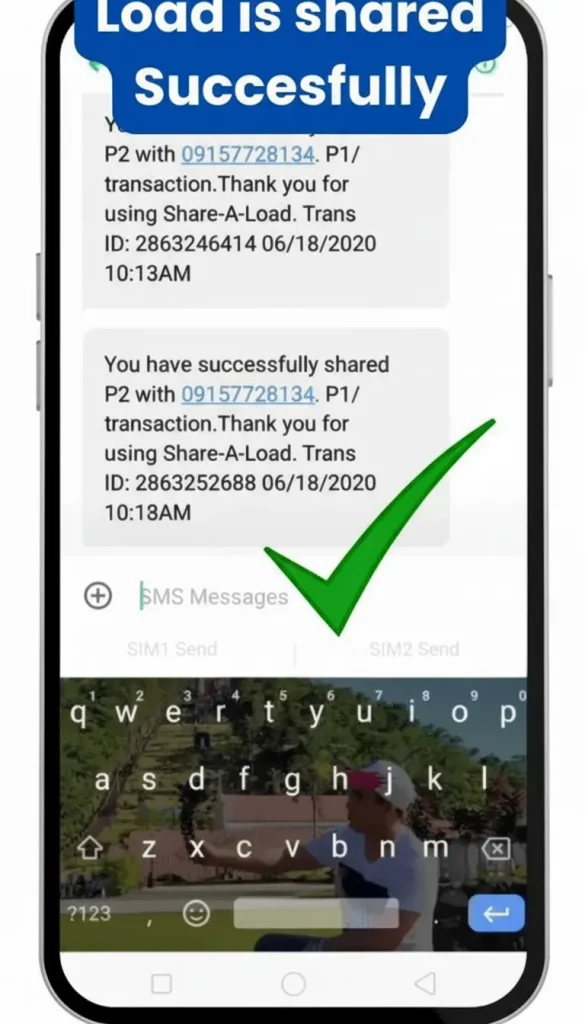
You will receive a confirmation SMS from Globe. If you are using SMS or USSD, reply ‘YES’ immediately to complete the transaction.
Conclusion
Sending loads to friends and family has never been easier with Globe. You can share a load in Globe quickly and safely. Just use the *143# USSD code, the GlobeOne app, SMS, or GCash. It’s that easy! Double-check recipient numbers. Keep your Share PIN safe. Confirm transactions quickly to avoid mistakes.
By following the instructions in this guide, you can also share selected promos and data bundles, helping your loved ones stay connected at all times. For more information or assistance, please contact Globe Customer Service.
Stay connected, save time, and make the most of your load with Globe’s reliable pasaload services.